Agentic coding techniques
Since LLMs have been available, I've been doing a lot of coding using agents. Unlike shoving AI into every app, replacing customer support with chatbots, generating endless streams of slop, etc., agentic coding is actually useful. If used right – and, crucially, by someone who understands and reviews the code before merging it – it's an incredible time saver.
In this post, I'm going to share some of the techniques that I've been using recently to get coding agents to 1) write high quality code that's easy to maintain, and 2) to do so securely, in such a way that the agent can't access data outside what it needs to achieve the task.
The AI industry sucks
But first, don't get me wrong. The AI industry is terrible. It's driving environmentally destructive data centers that everyone hates. It's consolidating power into the hands of a tiny group of reactionary billionaire weirdos that seem to genuinely believe they're building a god, and also that really want military contracts so they can build autonomous killing machines. It's flooding the internet with slop, and Google AI Overviews are spreading misinformation on an a scale unprecedented in human history.
The AI industry is a bubble built on hype and lies and debt, and the promise that executives can fire all their workers and still make lots of profit. It's a house of mirrors that will inevitably come crashing down. Anthropic and OpenAI sell $20/month plans knowing that if their users use as many tokens as they're given, it costs them way more money than it makes them. But they don't care because everything is fake. It's all terrible, and at some point soon, the whole thing will collapse.
I have no idea exactly what it will look like when that happens, but I do know that the era of cheap access to extremely powerful LLMs will end. It's only a matter of time before the actual costs will catch up to them. This already happened with GitHub Copilot. Starting in June, GitHub began charging based on actual usage, and it became way too expensive, so I (and many, many others) stopped using it.
Given this, I've decided that since agentic coding is able to write high quality code (if done correctly, not just by default lol) much faster than I can, and since frontier models are cheaper now than they ever will be again, I might as well take advantage of them while I can.
When everything crashes back down to earth, destroying the economy with it, hopefully we'll be left with some capable open models. And with our brains intact, too, of course.
Open weight models
When possible, I like using open weights models. I have a Framework Desktop server with 128GB of RAM and a GPU running an Ollama server, giving me access to private, local models. The best coding model I've found that runs on my hardware is qwen3-coder-next:q8_0 (84 GB), and the best vision model (that's able to look at images) that runs on my hardware is qwen3-vl:32b-thinking-q8_0 (35 GB).
But unfortunately, even qwen3-coder-next doesn't compare to the frontier models from Anthropic and OpenAI. Because of this, I use local LLMs for these purposes:
- Code generation for secret projects, where I don't want to share any information about the project, like its source code, or the fact that it exists, with any third parties (like OpenAI, Anthropic, GitHub, etc.).
- Direct data analysis with datasets that I don't want to share with third parties. (Though most of the time I'm writing code to help analyze data, the data might be sensitive, but the code itself isn't. In that case, I often use frontier models to write the code, and then I set the code loose on the private data.)
- A local, private chatbot for simple tasks that don't require huge context windows or lots of reasoning. I use a local Open WebUI server to give me access to a chatbot interface in the style of ChatGPT or whatever, where I can manage multiple sessions.
- I haven't really had a use for it, but I will totally use models if I need to do a large number of small repetitive tasks. For example, let's say I have a million screenshots, and I want to extract the URLs in browser windows from each screenshot (a saw talk last year where the researchers did this). I could do this with my local model for free, where I'd have to pay OpenAI or Anthropic for tokens to use their API.
Agentic coding tools
For awhile I was using Visual Studio Code and GitHub Copilot, but I stopped when I had to actually pay for my usage. It was just too expensive. I still use VS Code as an editor, but now I do agentic coding itself using CLI-based tools that differ depending on the model I'm using.
Here's what I use:
- Claude Code CLI for Anthropic models like Opus 5 and Fable 5
- Codex CLI for OpenAI models like GPT 5.6 Sol
- OpenCode for my locally hosted models on Ollama
Both Claude and Codex have desktop apps, which I've tried. They're reasonably nice, but I prefer the CLI versions, especially because it makes it much easier to sandbox them.
LLM skills
The last few months, I've gotten really into using Matt Pocock's LLM skills. It's actually entirely changed the way I use LLMs for agentic coding. Here's a video where he explains his workflow, end-to-end:
I've found that using "grilling session," where the LLM relentlessly asks me a series of questions about the feature I'm making, and then uses the answers to write a spec, really helpful at uncovering and deciding on thorny implementation details before writing any code.
I've also found that allowing the LLM to interface with your issue tracker is kind of amazing, and allows you to use agents much more autonomously. The /to-tickets skill can help turn a detailed spec into a series of GitHub issues (or wherever you want to track your issues), and automatically label them things like "ready-for-agent" or "ready-for-human". The /implement skill can frequently implement an entire well-defined issue in one go, including doing a code review and creating a PR.
There are also some other skills that seem useful for certain codebases or tasks. I've been doing some mobile development using Expo, and I've found that Expo Skills are really good at doing thorny-but-tedious maintenance tasks like upgrading to a new version of Expo. And while I haven't tried these yet, I have my eye on this Trail of Bits repo of skills for security research.
Sandboxing the agents
Since I've been using the Matt Pocock skills, I've found that it's entirely feasible to tell codex something like:
$implement https://github.com/{link-to-an-issue}. Implement it in its own branch. When you're done, push your code and create a PR.
Then, 45 minutes later, you have a PR waiting for you to review. If the issue and test seams are well-defined, it's frequently even ready to merge as-is.
But to actually let the agent sit there doing its thing without constantly interrupting its work waiting for you to approve various access, you need to run it in the extremely unsafe YOLO mode, where you just say yes to everything.
- With
claudethis is--dangerously-skip-permissions - With
codexthis is--dangerously-bypass-approvals-and-sandbox
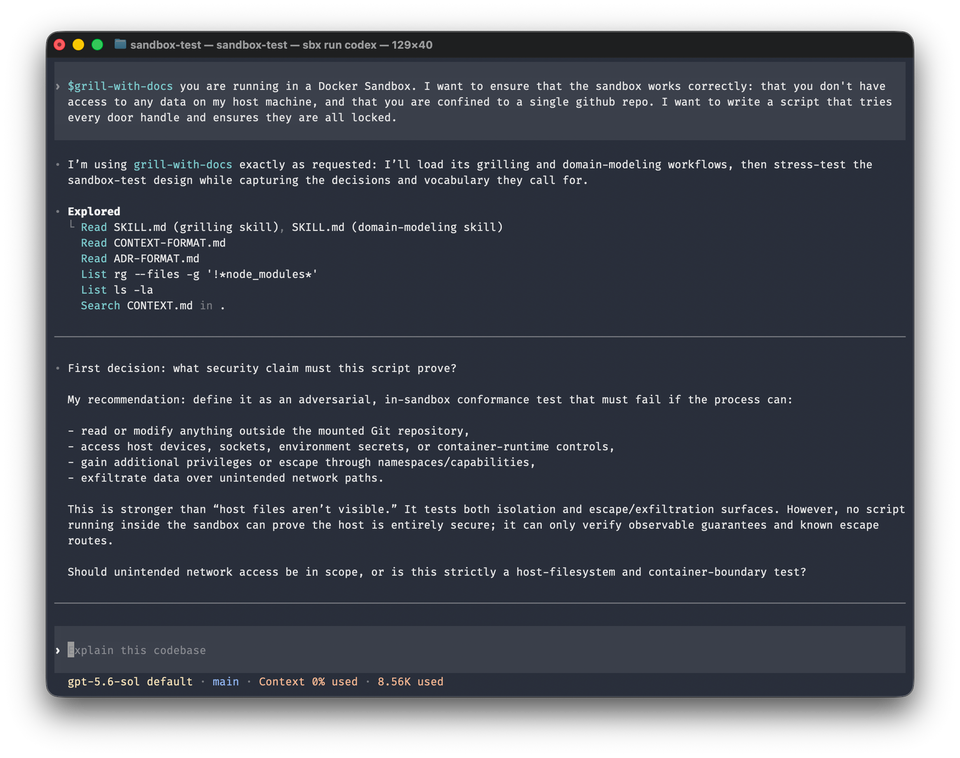
You obviously never should run agents like this directly on your computer. There are many options for sandboxing, but my current workflow is Docker Sandboxes, and it works great.
After you install Docker Sandboxes, you use the sbx command to create and manage sandboxes and run agents (like Claude, Codex, OpenCode, etc.) inside a sandbox. Each sandbox is isolated so that:
- It runs its own Docker VM for the sandbox container, so it doesn't share a Linux kernel with anything else.
- The container is able to run other Docker containers within the same VM, so for example, if your tests rely on Docker Compose, it can still run your tests.
- All network access is proxied through the host with a firewall of allowed domains. By default it only allows common coding domains for services like GitHub, NPM, PyPi, etc., but you can restrict it or open it up as much as you want, per-sandbox.
- It supports credential isolation, so each sandbox can be configured different for authentication to OpenAI, Anthropic, GitHub, etc.
Isolating GitHub access
When the agent reads a GitHub issue, or opens a PR, or analyzes why an Actions workflow failed, it uses the GitHub CLI tool, gh , authenticated as you. The simplest way to authenticate to gh is just by logging in using a browser, basically giving gh full access to your GitHub account.
This might by fine for your personal gh use, but I wouldn't trust a coding agent with that access. If you're working on some fun hobby project, an agent that gets prompt injected could, for example, use gh to access all of your secret work repositories.
Instead, it's possible to create repo-scoped GitHub tokens, so that the agent is only allowed to go wild on the specific repo it's working on with limited permissions, and can't access anything else.
The actual mechanics of how I've set this up is pretty complicated, so I think I'll save it for a future post. But in short:
- I create a GitHub fine-grained personal access token (PAT), strictly limiting it to the repo(s) that each specific sandbox will be working in. I store the PAT is the
sbxsecrets manager scoped just to that sandbox, which uses it to authenticate withghinside the sandbox. - I create a dedicated SSH key (marked as signing-only in my GitHub account) for use by agents, for signing commits. I ensure my SSH agent forwards just this one signing key into the container, and no other SSH key.
Now, if an agent goes rogue, it will not only be contained in a Docker container, unable to wreak havoc on my computer, but it will also be contained to a single GitHub repo, unable to wreak havoc (or steal secrets from) unrelated projects.
I hope you found this helpful! Happy coding.
If you found this interesting, subscribe to get these posts emailed directly to your inbox. If you want to support my work, consider becoming a paid supporter.
Member discussion